Here you will find information on how to apply for your degree certificate. Familiarise yourself with the checklist and the instructions on how to submit an application for graduation in Sisu.
When should I apply for my degree certificate?
You should apply for your degree certificate once you have completed your studies. The date on which you submit a complete graduation request will also become your official graduation date. Follow the checklist below to ensure everything is done correctly.
You Can Apply for Your Degree Certificate When:
- You have completed all your studies.
- You are registered as present and have an active study right.
- All your completed courses and language proficiency in the second national language (both oral and written) are registered in Sisu.
Important:
If you apply for your degree certificate before the 18th of the month, you may need to repay student financial aid for that month. If you receive student financial aid, your graduation date may affect your support. Please make sure to check Kela's regulations.
When all of your required study attainments are completed and registered in Sisu, you can begin the process of applying for your degree certificate.
The final step before graduation is to follow the checklist below. Make sure to complete everything before the semester deadline. It is your responsibility to meet the given deadlines.
Checklist for applying for your degree certificate:
- Complete the AVOP survey.
- Upload your thesis to Theseus.
- If you completed your thesis before autumn 2024: Send the statement regarding your thesis to studiearenden@arcada.fi for archiving. If you completed your thesis in autumn 2024 or later: You do not need to submit the statement yourself.
- Submit your graduation request in Sisu (see instruction under "Graduation request in Sisu" below). Please note that you should also register for the graduation ceremony (if you plan to attend). An external link to the graduation ceremony registration can be found in Sisu and should be completed at the same time as submitting your graduation request.
-
Register as an alumni and explore the alumni network .
Important: Your IT access rights will expire shortly after submitting your degree certificate application. Remember to save any important files and emails before that.
Graduation request in Sisu
To graduate, you must submit a separate application in Sisu. Having completed all courses and having your thesis approved does not mean you are automatically graduated. You still have to apply separately.
How to apply in Sisu:
- Go to "Structure of studies ". When all your courses are completed, you will receive a green notification in Sisu. This notification means that you are eligible to submit your graduation request.
- Click on the yellow ribbon icon to open the application.
- Fill out the application step by step. Please note that the registration for the graduation ceremony is done through a separate portal, which you will get the link for in Sisu. Please read the instructions carefully.
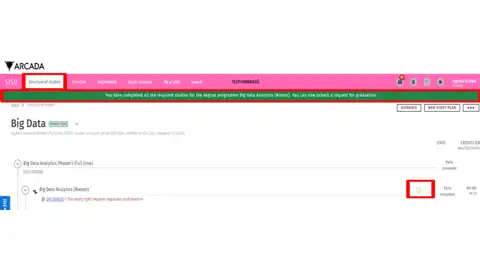
No green notification?
If a green notification does not appear, it means that not all parts of the study plan are complete. Under the "STATE" heading, selections must be done and parts completed. If there are red triangles (indicating "against the rules") or it says "selections incomplete", the graduation request will not be activated. Contact your student counsellor if anything in your study plan needs to be corrected.
If the application for graduation is not activated even though all studies have been completed, the selections have been done and all parts have been completed, it is usually because the final course was registered on the same day. In that case, you just need to wait one day. After that, the application should be activated.
Please contact studiearenden
Processing time the degree certificate
The processing time is usually around three weeks from the submission of a complete application. However, during non-teaching periods, the processing time is longer. Around public holidays and non-teaching periods (especially over Christmas and New Year, as well as in May and June), the processing time will exceed three weeks.
Please note that you are personally responsible for keeping track of deadlines and application periods.