Do you want to study English, German, French or Spanish at Hanken? The registration is done through cross-institutional studies in Arcada's Sisu
Hanken's language courses can be found through the search function in Sisu , under the tab “Cross-institutional courses”. Once you have found a language course offered by Hanken that you would like to complete, contact your study counsellor.
If you receive approval that the course fits into your degree, you must go to your personal study plan in Sisu and place the course under the section for development studies. Once the course is placed in your study plan, you may register for the course when the registration period is open. Please note that registration periods and participation quotas are defined by Hanken, and Arcada cannot influence these.
▶️🎥 Here is a video with instructions on how to register; just remember to choose the network called Language studies Arcada Hanken, and not Campus Online that is mentioned in the video
Sisu search function: Explore the available courses
-
Ensure that you are on the "Cross-institutional courses " tab under “Search”. In the drop-down menu for “Cross-institutional course networks”, choose the appropriate network: Language studies Arcada Hanken
Click "Add to course cart" on the right of courses you are interested in. This allows you to easily find them again when you go to your study plan and click the blue button “Add to the plan”.
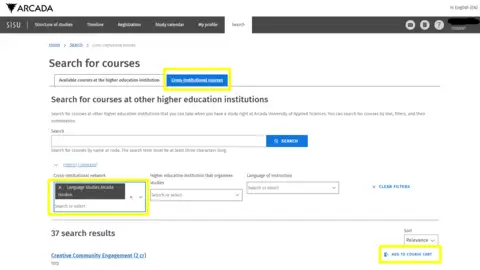
- Before registering, make sure that the course you wish to take at another institution is applicable to your degree at Arcada. You do this by contacting your study counsellor or degree programme director in advance.
-
Add the Campus Online course to your personal study plan in Sisu to enable registration
✔ Navigate to the “Development Studies” section in your study plan (or Optional studies as a master's student)
✔ Click the blue bar “Add to the plan” and add the COL course under your development studies section (or optional studies if you are a master student)
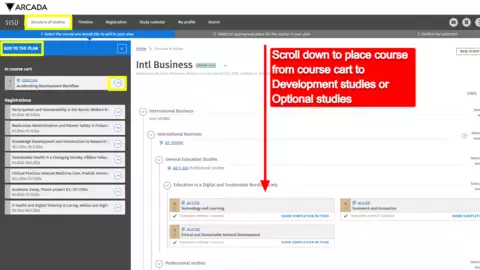
- Select the method of completion, just as you would for compulsory courses (see registration instructions here)
-
Register to the course when the registration period is open, using the same procedure as for your compulsory courses (see registration instructions here)
You can track your registration status under the "Registration " tab in Sisu, provided you have followed the steps 1–5 above.
⚠ Please note that most courses have limited numbers of spots and may fill up quickly. It is therefore possible that you may not secure a place even if you register within the registration period.
⚠ Please also note that it may take several days for Hanken to process your registration. You may receive confirmation of your participation only after the registration period has ended. Arcada has no control over the registration procedures, timelines, or student quotas set by the hosting UAS.
- Make sure to follow Hanken's instructions regarding account activation, userID, accessing course materials, etc. This information is typically found on the host institution’s public website. If you have difficulty accessing course materials or are unable to register for the course, you must contact the host institution directly. Arcada's staff members do not have access to this information and cannot assist you.
Contact
Questions regarding the instructions or how to register to Campus Online studies? Contact korsstudier