On this page you can find information on which networks you have a right to based on your current study right. Click on the name of the network to read more about what education programmes are included in the industry-specific network.
After familiarizing yourself with this information, you can find the instructions for how to register for cross-institutional studies on the page Registration for teaching under the title Registration for cross-institutional studies.
Check which networks are compatible with your study right
You can check which networks are compatible with your study right by logging in to Sisu, going to the tab My profile, and opening the information about your study right by clicking the arrow to the left of the name of the educational programme connected to your study right. Next, scroll down to the title "Network right to be included in the study right". Under this title you can find information about which networks are compatible with your study right, as well as what the networks are called.
Check which course units are offered within the cross-institutional network
Log in to Sisu. Go to the "Search" tab and choose "Cross-institutional courses". In the drop-down menu for "Cross-institutional network", choose the network you would like to explore. Note that all networks Arcada are included in can be seen in this drop-down menu, so you need to check which networks are compatible with your specific study right.
- CampusOnline AMK if you are a bachelor's student (AMK stands for "ammattikorkeakoulututkinto", meaning "UAS Bachelor's degree").
- CampusOnline YAMK if you are a master's student (YAMK stands for "ylempi ammattikorkeakoulututkinto", meaning "UAS Master's degree").
- Choose other networks if you want to see the selection included in them
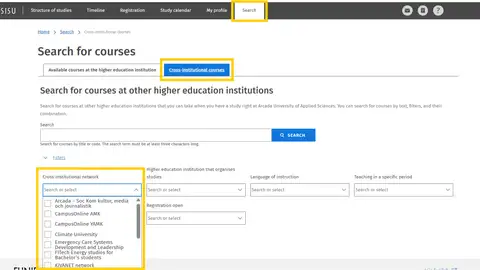
After you have filled in the search criteria the course selection should be visible when you scroll down.
You can find the instructions for how to register for cross-institutional studies on the page Registration for teaching under the title Registration for cross-institutional studies.
Networks that Arcada are included in
Below you will find information about all the networks that Arcada is part of. First, the networks that are available to all students, regardless of their field of study, are listed. Further down, you will find networks specific to Business, Social and healthcare, Culture and Media, and Technology. Remember to check whether there are any programme-specific restrictions or requirements based on your degree programme by clicking on the headings to view additional information.
Optional studies for everyone – both bachelor's and master's level studies
CampusOnline (AMK for bachelor & YAMK for master)
Development studies, optional studies
The Campus Online collaboration (COL) is the shared digital course selection for Finnish universities of applied sciences. COL-studies are available and free for all UAS students who are registered as present for the current academic year/semester, both bachelor’s and master’s students. These studies are perfect for students who, for example, would like to complete a course off campus/online.
Note that you should always contact your study counsellor or degree programme director before you register for Campus Online studies, to ensure that the course unit is suitable for your degree.
Language studies Arcada Hanken
Development studies, optional studies
Arcada and Hanken have a collaborative agreement regarding language studies. Arcada students can complete language studies at Hanken. Familiarize yourself with the course offerings by following the instructions at the top of this page.
The Nightingale mentoring programme
The Nightingale mentoring programme brings together higher education students and children in their third to sixth school years. The programme is part of the University of Helsinki’s science education and academic outreach efforts, and a collaboration with the City of Helsinki’s Basic Education Department. The programme’s partner schools are Botby Comprehensive School, Nordsjö Primary School, Staffansby Primary School, Pihkapuisto Primary School and Kontula Primary School. The program is bilingual and has activities in Swedish and Finnish.
Climate University
The Climate University network offers studies regarding climate change and sustainability. Climate University courses are based on material available on their website climateuniversity.fi . Multiple higher education institutions are included in this network.
KiVANET network
The KiVANET network offers language studies online.
Business
Supply Chain Management studies Arcada Hanken
Suitable for the degree programmes Företagsekonomi and International Business. Students with supply chain management as their major/study track are automatically included in the network, meanwhile students with other majors/study tracks can apply for network access.
The Finland-Swedish Business Network
Suitable for degree programmes Företagsekonomi & International business (bachelor-level), and Business Management and Transformation on master-level (previously called International Business Management).
Social and health care collaboration studies
Collaboration studies can, for example, include compulsory course units for the degree you are completing, but for which another institution is responsible for.
Emergency Care Systems Development and Leadership - collaboration studies with LAB
A section of the master's programme Emergency care systems development and leadership studies is provided by LAB. You as a master's student at Arcada need to register for the course unit at LAB UAS.
Leadership in Healthcare and Social Services - Novia and Arcada
A section of the master's programme Healthcare leadership studies is provided by Novia.
Arcada and Novia collaborate on the units Healthcare Leadership (respectively called Leadership for Future Health Care and Social Services at Novia, 10 cr) and Change Leadership (5 cr). During the academic year 2026-2027 Novia is responsible for Leadership for Future Health Care and Social Services, meanwhile Arcada is responsible for Change Leadership.
Vaccination Knowledge - Novia and Arcada
All students within the healthcare industry need to complete the compulsory course unit Basics of Vaccination Knowledge 2 cr at Novia. Those studying to become public health care nurses also need to complete the course unit Basic Vaccination Knowledge 1 cr.
4Q Bachelor of Social Services / Community Educator Network
Students pursuing a Bachelor of Social Services degree at Arcada have the opportunity to take courses at Diak, Humak and KAMK as part of this network.
Culture and Media
Arcada – Soc&Kom kultur, media och journalistik
Within this network, elective studies are offered to students enrolled in the Film och media and Kulturproducentskap degree programmes.
Media BA Studies Online
Within this network, elective studies are offered to students pursuing a Bachelor's degree in Media.
Technology
FITech Energy studies for Bachelor's students
This network provides optional studies for engineering students. The following degree programmes are included in this network:
- Energi- och miljöteknik
- Materialteknik och hållbarhet
- Mechanical and Sustainable Engineering
- Informationsteknik
- Information Technology
- Machine Intelligence and Data Science (MIND)